
Introduction
If you’ve recently started learning SEO, you’ve probably come across the term On-Page SEO. If you’re completely new to SEO, you can first read our [Beginner’s Guide to SEO] before diving deeper into On-Page SEO.. It’s one of the fundamental aspects of search engine optimization and plays a major role in helping your web pages rank higher in search results.
Unlike Off-Page SEO, which focuses on building your website’s authority through external efforts, On-Page SEO is all about optimizing the elements within your web pages. From creating high-quality content and using the right headings to optimizing title tags, images, and internal links, every element contributes to making your page more valuable for both users and search engines.
In this beginner-friendly guide, you’ll learn what On-Page SEO is, why it’s important, its key elements, best practices, and common mistakes to avoid. Whether you’re a student, blogger, or someone starting a career in digital marketing, this guide will help you build a strong foundation in On-Page SEO.
What Is On-Page SEO?
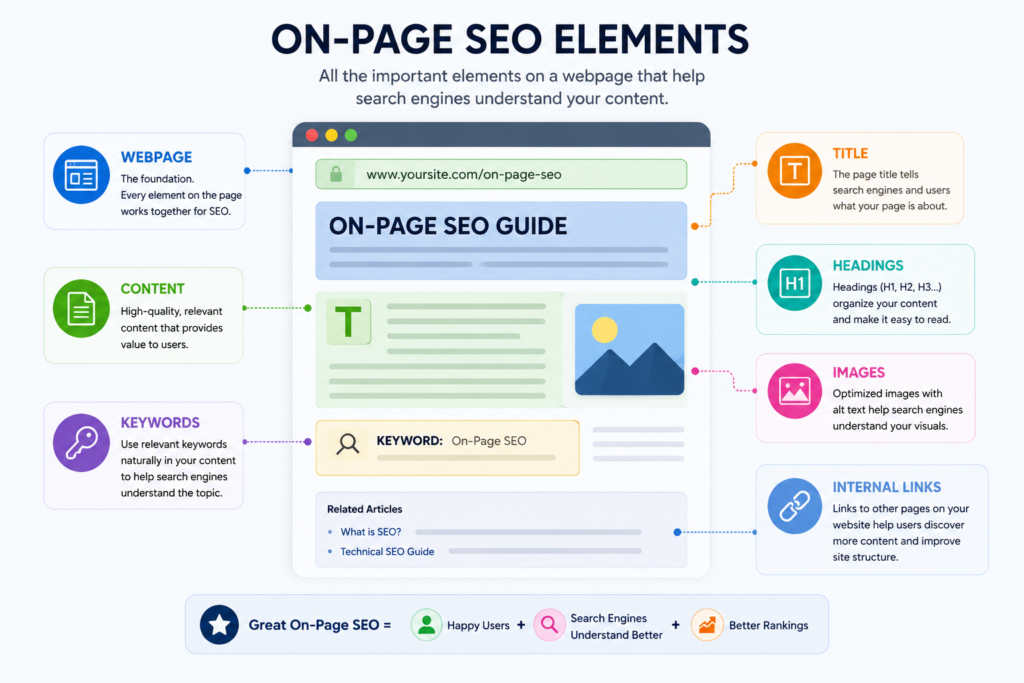
On-Page SEO is the process of optimizing the content and HTML elements of a webpage to help search engines understand it better and improve its visibility in search results. Unlike Off-Page SEO, which focuses on external factors like backlinks, On-Page SEO involves changes that you can directly make on your own website.
Some of the most important On-Page SEO elements include high-quality content, title tags, meta descriptions, heading tags (H1, H2, H3), URL structure, keyword optimization, image alt text, internal links, and page speed. Together, these elements make your webpage more organized, relevant, and user-friendly.
The primary goal of On-Page SEO is not just to rank higher on Google but also to provide a better experience for users. When your content is well-structured and answers the user’s search intent, search engines can easily crawl, understand, and index your page, increasing its chances of appearing in relevant search results.
Why Is On-Page SEO Important?
On-Page SEO is important because it helps search engines understand the content, topic, and purpose of a webpage. By optimizing elements such as content, headings, titles, and keywords, you provide Google with clearer information about your page and help it determine when the page may be relevant to a user’s search.
It also improves the experience for visitors. Well-structured content, accurate information, clear headings, optimized images, and a properly functioning webpage make it easier for users to find and understand what they are looking for.
When a webpage is useful, well-structured, and properly optimized, it has a better chance of gaining visibility in relevant search results. This can ultimately help bring more organic traffic to your website.
Your three ideas are all still here: Google understanding → better user experience → organic traffic. We just made them accurate and readable.
On-Page SEO vs Off-Page SEO
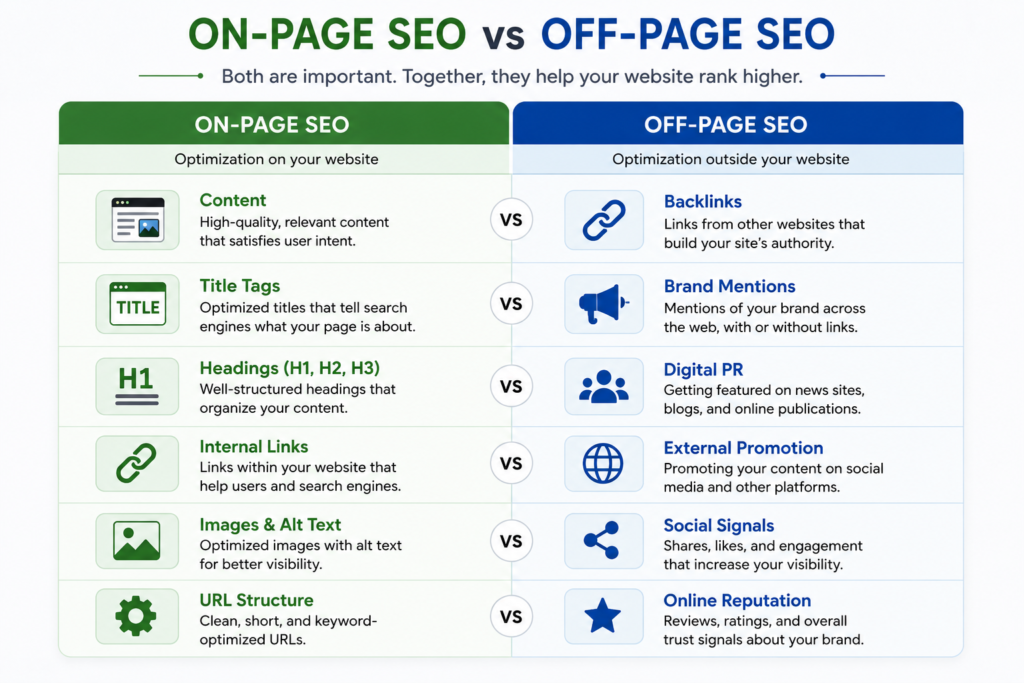
On-Page SEO and Off-Page SEO are two important parts of SEO, but they focus on different areas.
On-Page SEO refers to the optimization you make directly on your own website. This includes improving your content, optimizing title tags and headings, using keywords naturally, adding alt text to images, and creating internal links.
Off-Page SEO, on the other hand, focuses on activities outside your website that can help build its authority and reputation. One of the most common examples is earning backlinks from other websites. Other activities can include brand mentions, digital PR, and content promotion.
For example, if you improve an article on your own website, that’s On-Page SEO. If another website links to that article, that’s an example of Off-Page SEO.
In simple terms, On-Page SEO focuses on improving your own webpages, while Off-Page SEO focuses on building your website’s authority outside your website. Both work together to support your overall SEO strategy.
On-Page SEO vs Technical SEO
On-Page SEO and Technical SEO both focus on improving your website, but they deal with different aspects of SEO.
On-Page SEO focuses mainly on the content and elements of individual webpages. This includes things such as titles, headings, keywords, content, images, internal links, and URLs. The goal is to make the page useful for visitors and easier for search engines to understand.
Technical SEO focuses on the technical structure and performance of your website. It includes areas such as website speed, mobile-friendliness, crawlability, indexing, XML sitemaps, HTTPS, and structured data.
For example, optimizing the headings and content of your blog post is On-Page SEO, while making sure Google can crawl and index that blog post properly is Technical SEO.
In simple terms, On-Page SEO improves what is on the page, while Technical SEO improves how the website works behind the scenes. Both are important because even great content can struggle to perform if search engines cannot properly access, crawl, or understand the website.
Important On-Page SEO Elements
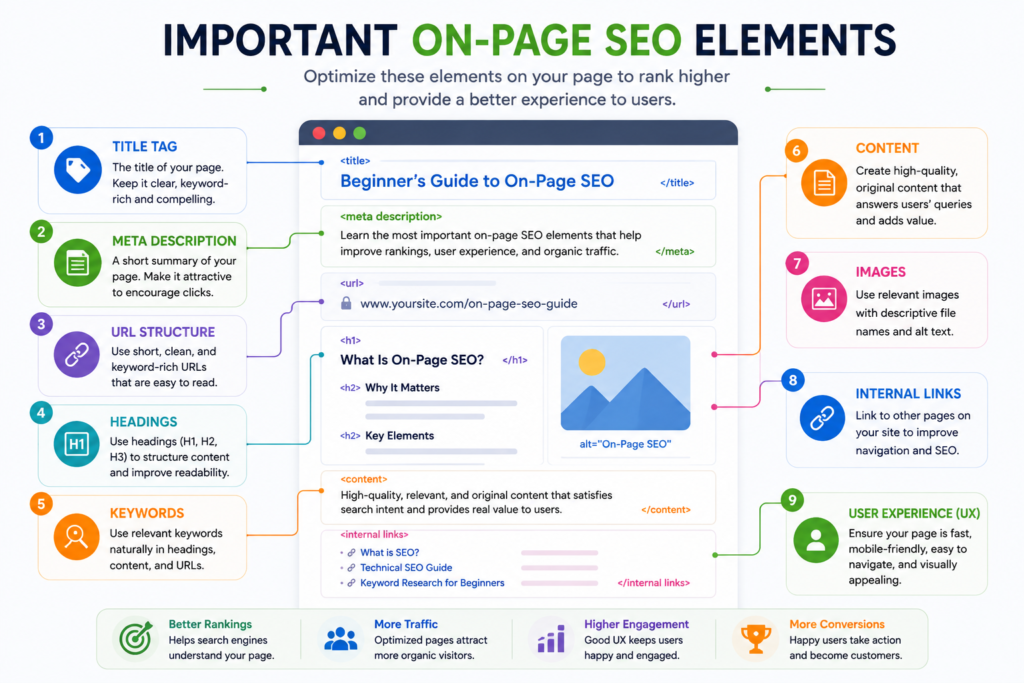
On-Page SEO involves several elements that can be optimized directly on a webpage. Each element helps search engines understand your content while also making the page easier and more useful for visitors.
Here are some of the most important On-Page SEO elements you should understand:
Title Tag
The title tag is the title of a webpage that can appear in search engine results and helps search engines understand the main topic of the page.
A good title should be clear, relevant to the content, and naturally include the primary keyword when appropriate. It should also give users a reason to click on the page.
For example:
Weak:
SEO Tips
Better:
10 On-Page SEO Tips for Beginners
Meta Description
A meta description is a short summary that describes what a webpage is about. It can appear below the title in search results and can help users decide whether the page is relevant to their search.
A good meta description should accurately describe the page, include the main topic naturally, and encourage the right users to click.
URL Structure
A URL tells users and search engines where a webpage is located. A clean and descriptive URL makes the page easier to understand.
For example:
Poor:
example.com/page?id=123
Better:
example.com/on-page-seo-guide
Keep URLs short, descriptive, and relevant to the page topic.
Heading Tags (H1, H2, H3)
Headings organize the content of a webpage into a clear structure.
The H1 usually represents the main title of the page, while H2 headings divide the content into major sections and H3 headings can be used for subsections.
For example:
H1: On-Page SEO Guide for Beginners
H2: Important On-Page SEO Elements
H3: Title Tag
A logical heading structure makes long content easier for users to read and helps search engines understand how different sections of the page are related.
Keyword Placement
Keywords are the words or phrases people use when searching for information.
Using relevant keywords naturally in important areas such as the title, headings, introduction, and body content can help search engines understand the topic of your page.
However, keywords should never be forced into the content repeatedly. This practice, known as keyword stuffing, can make the content difficult to read and does not create a good experience for users.
The goal should be to write naturally and use keywords where they genuinely fit.
High-Quality Content
Content is one of the most important parts of On-Page SEO.
A well-optimized page should provide useful, accurate, original, and relevant information that satisfies the user’s search intent. Instead of writing content only to include keywords, focus on answering the reader’s questions and providing genuine value.
Good content should be:
- Relevant to the topic
- Easy to understand
- Well-structured
- Helpful to the reader
- Written for people first
Internal Links
Internal links are links that connect one page of your website to another page on the same website.
For example, while writing an article about On-Page SEO, you could link to your Beginner’s Guide to SEO if it provides useful background information.
Internal linking can help users discover related content and can also help search engines discover and understand the relationship between different pages on your website.
Image Optimization
Images can make your content more engaging, but they should also be optimized properly.
Important image optimization practices include:
- Using descriptive file names
- Adding relevant alt text
- Compressing images to reduce file size
- Using an appropriate image format
For example, instead of naming an image IMG1234.jpg, a descriptive name such as on-page-seo-checklist.jpg gives more context about the image.
Alt text is particularly useful because it describes an image for users who cannot see it and helps provide additional context about the image.
External Links
External links are links from your webpage to relevant pages on other websites.
When appropriate, linking to trustworthy and authoritative sources can help provide additional information and support claims made in your content.
For example, when discussing Google’s SEO guidelines, linking to an official Google resource can help readers explore the topic further.
External links should be relevant and useful rather than added simply for SEO purposes.
Mobile Friendliness
A large number of people access websites through smartphones, so your webpages should work properly on smaller screens.
A mobile-friendly page should have:
- Readable text
- Easy-to-use navigation
- Properly sized images
- Buttons and links that are easy to tap
- A layout that adapts to different screen sizes
Mobile friendliness is broader than On-Page SEO and is also an important part of technical SEO and overall page experience.
Page Speed
Page speed refers to how quickly a webpage loads and becomes usable.
A slow website can frustrate visitors and may negatively affect their experience. Large images, unnecessary scripts, and poorly optimized website resources can all contribute to slower pages.
Tools such as Google PageSpeed Insights can help you identify performance issues and understand what can be improved.
Page speed is primarily considered part of technical SEO and page experience, but it is important to consider when optimizing the overall quality of a webpage.
User Experience (UX)
User experience refers to how easy and comfortable it is for visitors to use your website.
A good page should be easy to navigate, readable, visually organized, and focused on helping the visitor accomplish what they came for.
SEO isn’t only about helping search engines understand a page. The page also needs to work well for the people who visit it.
When content, structure, usability, and technical performance work together, you create a webpage that is useful for both users and search engines.
On-Page SEO Checklist Before Publishing
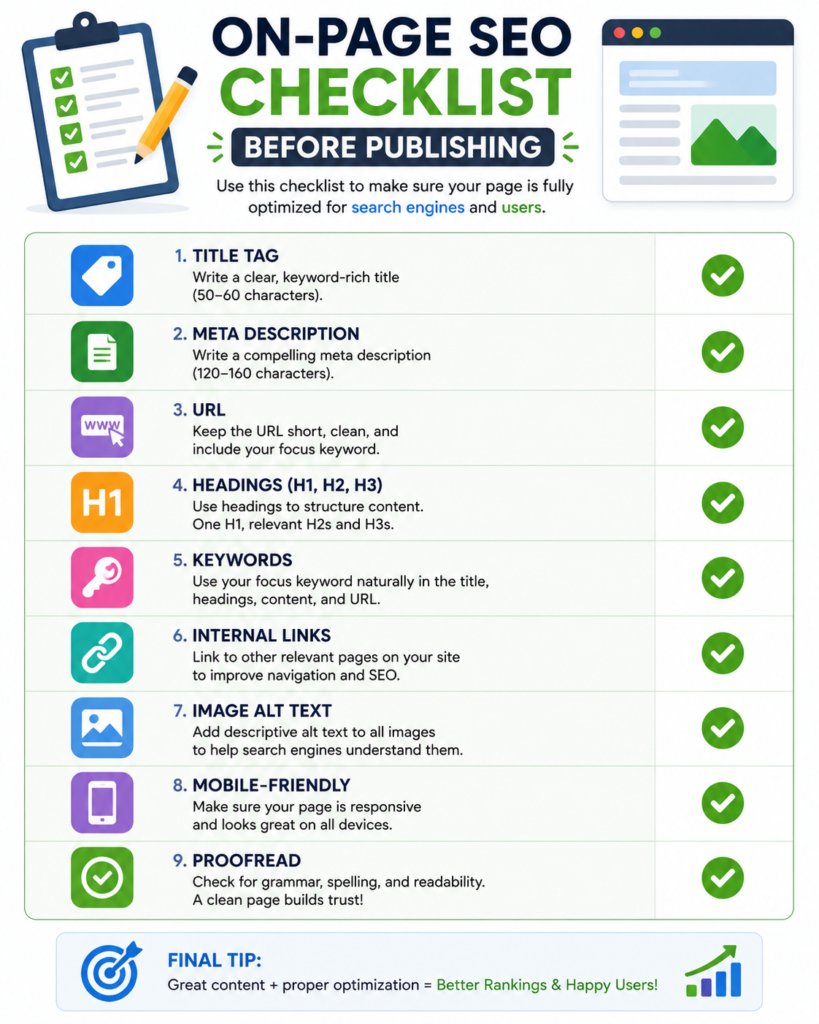
Before publishing a webpage or blog post, it’s useful to go through a quick On-Page SEO checklist. It can help you catch simple optimization issues before the page goes live.
On-Page SEO Checklist
- Choose a relevant primary keyword based on the topic and search intent.
- Write a clear and descriptive title tag.
- Add a useful meta description.
- Create a short and descriptive URL.
- Use a clear H1 for the main topic.
- Organize the content with relevant H2 and H3 headings.
- Use keywords naturally instead of repeating them unnecessarily.
- Make sure the content answers the user’s search intent.
- Add relevant internal links to other pages on your website.
- Use descriptive image file names and appropriate alt text.
- Compress images where necessary to avoid unnecessarily large file sizes.
- Check that links, images, and other important page elements are working properly.
- Make sure the page is easy to read and works well on mobile devices.
- Proofread the content before publishing.
This checklist doesn’t guarantee higher rankings, but it helps make sure the important elements of your page have been properly reviewed before publication.
Common On-Page SEO Mistakes
Even after learning On-Page SEO, beginners can make simple mistakes that can affect the quality and usability of their webpages. Here are some common mistakes to avoid.
Keyword Stuffing
Adding the same keyword repeatedly in an attempt to rank higher can make your content unnatural and difficult to read. Keywords should be used naturally where they make sense.
Duplicate Content
Publishing the same or very similar content across multiple pages can create confusion about which page should be shown in search results. Try to provide unique value on each important page.
Missing Alt Text
Images without appropriate alt text can be less accessible to users who cannot see them. Descriptive alt text can also provide search engines with useful context about an image.
Using Multiple H1 Tags Without a Clear Structure
An H1 should clearly represent the main topic of a page. While having more than one H1 isn’t automatically a ranking problem, a clear and logical heading structure makes the page easier to understand and navigate.
Ignoring Internal Links
Publishing useful content without connecting it to other relevant pages on your website can make it harder for users to discover related information. Internal links can also help search engines discover and understand the relationship between your pages.
Writing Only for Search Engines
One of the biggest mistakes is focusing so much on SEO that the content becomes difficult or unnatural for people to read. Search engines are important, but your primary goal should be to create useful content that genuinely helps the reader.
Good On-Page SEO should support your content—not get in the way of it.
Best Tools for On-Page SEO
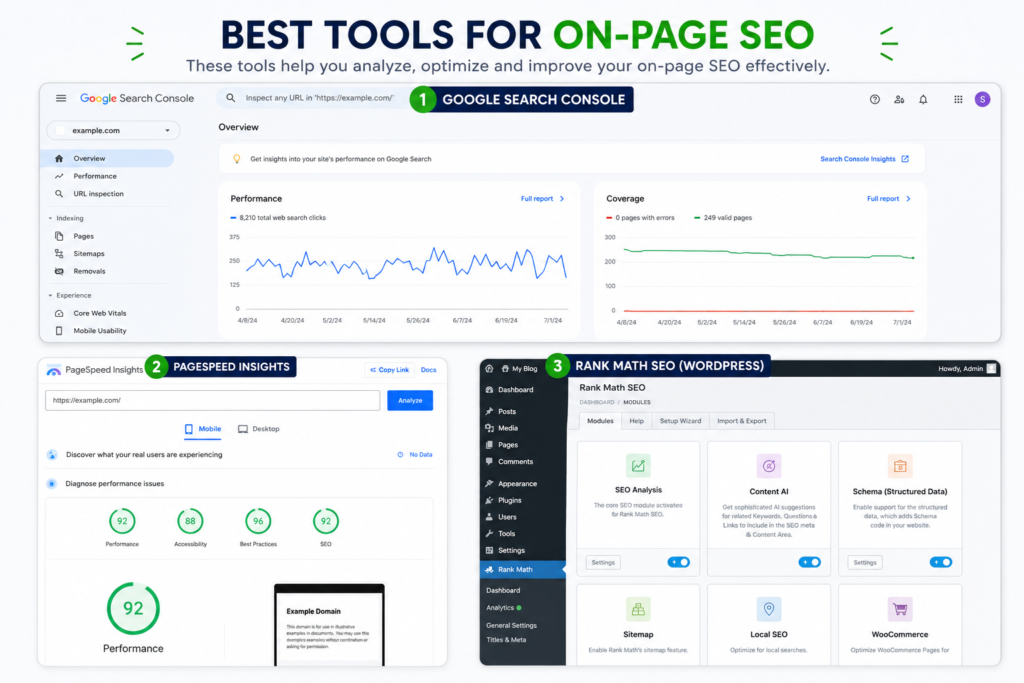
You don’t have to check every On-Page SEO element manually. Several tools can help you analyze webpages, find optimization issues, and understand how your website is performing.
Here are some useful tools for beginners:
Google Search Console
Google Search Console is a free Google tool that helps you monitor your website’s performance in Google Search. You can use it to see search queries, clicks, impressions, indexing issues, and which pages are appearing in search results.
Google PageSpeed Insights
Google PageSpeed Insights analyzes the performance of a webpage on both mobile and desktop devices. It provides performance scores and suggestions for improving page speed and user experience.
Screaming Frog
Screaming Frog is a website crawler that can analyze important SEO elements such as page titles, meta descriptions, headings, URLs, broken links, and other technical issues.
Ubersuggest
Ubersuggest can help with keyword research and provide SEO insights such as keyword ideas, search volume, competition, and website analysis.
Rank Math
Rank Math is an SEO plugin for WordPress that helps you optimize individual pages and posts. It provides recommendations for elements such as focus keywords, SEO titles, meta descriptions, readability, and internal linking.
Each tool serves a different purpose, so you don’t need to use all of them. As a beginner, start with the tools that match what you’re trying to improve and gradually explore the others as you learn more about SEO.
Key Takeaways
On-Page SEO is one of the foundations of SEO because it focuses on the things you can directly improve on your own webpages. From creating helpful content and optimizing titles and headings to improving images, URLs, and internal links, these elements work together to make a webpage easier to understand and use.
While learning SEO, it’s important to remember that On-Page SEO is not about adding keywords everywhere or trying to make a page look perfect for search engines. The real goal is to create useful content that satisfies the user’s search intent and gives them a good experience.
As you continue learning SEO, On-Page SEO is only one part of the bigger picture. Technical SEO helps search engines access and understand your website, while Off-Page SEO focuses on building your website’s authority outside your own pages.
Understanding how these different areas work together will give you a stronger foundation for improving your website and developing your SEO skills.