
What Is Technical SEO?
Technical SEO is the process of optimizing the technical aspects of a website so that search engines can easily crawl, understand, render, and index its pages. It focuses on the website’s technical structure rather than the content itself.
Technical SEO includes areas such as crawling and indexing, XML sitemaps, robots.txt, website and URL structure, HTTPS, mobile-friendliness, page speed, Core Web Vitals, canonical URLs, redirects, structured data, and duplicate content.
In simple words, Technical SEO creates a strong technical foundation for a website, helping search engines access and understand its content more effectively.
Why Is Technical SEO Important?
Technical SEO is important because even high-quality content may struggle to perform in search results if search engines cannot properly access, crawl, or index a website.
A technically optimized website makes it easier for search engines to discover important pages, understand the website structure, and process its content. It can also improve factors such as mobile usability, page speed, and overall website accessibility.
By fixing technical issues and maintaining a healthy website structure, Technical SEO helps create a better foundation for search visibility, user experience, and long-term SEO performance.
How Does Technical SEO Work?
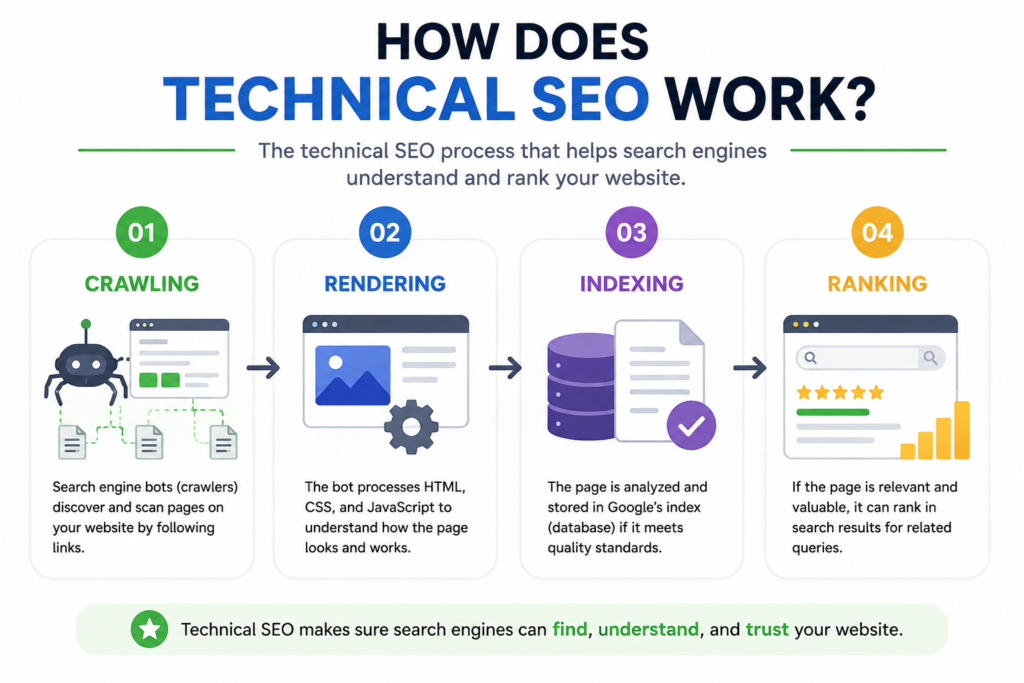
Technical SEO helps search engines access, process, and understand the pages on a website. The process can be understood through four main stages:
- Crawling: Search engines use automated programs, known as crawlers or bots, to discover and access web pages. Technical SEO helps ensure that important pages can be crawled without unnecessary restrictions.
- Rendering: After crawling a page, search engines may render the page to understand how its content and elements are displayed, especially when JavaScript is involved. A technically healthy website helps search engines access the resources needed to properly render its pages.
- Indexing: Once a page has been crawled and processed, search engines decide whether it should be stored in their index. Proper technical SEO helps ensure that important, indexable pages can be understood and included in the search index.
- Ranking: When someone searches for something, search engines evaluate indexed pages and determine which ones are most relevant and useful for that query. Technical SEO does not guarantee higher rankings, but a strong technical foundation helps search engines access and understand the website properly.
Technical SEO vs On-Page SEO vs Off-Page SEO
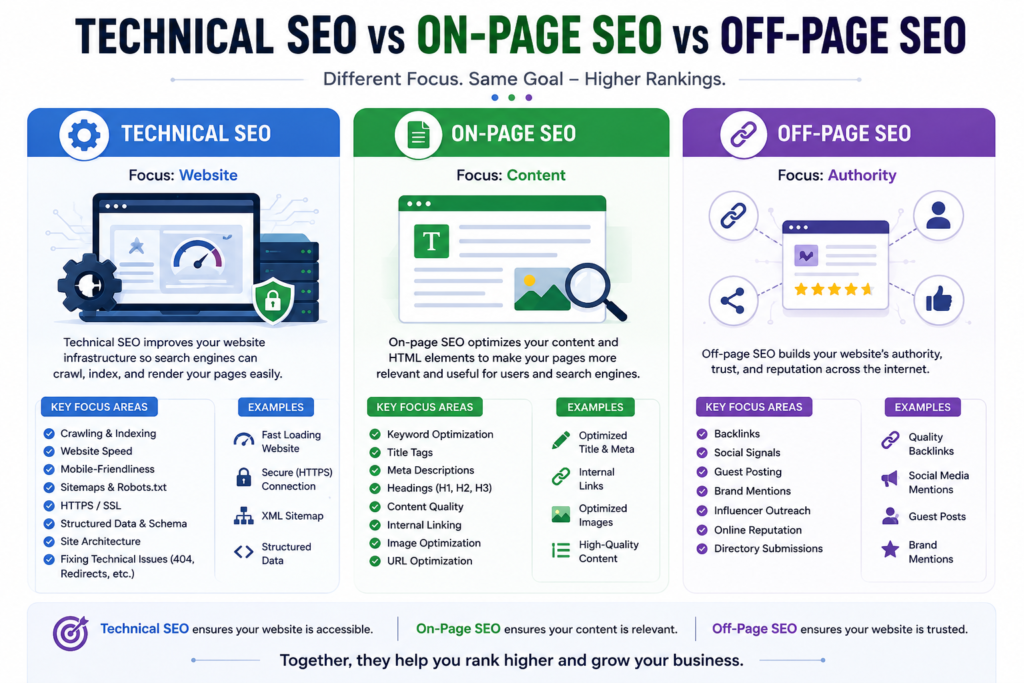
SEO can be divided into different areas, and each one focuses on a different part of a website’s overall search visibility. Technical SEO focuses on the website’s technical foundation, On-Page SEO focuses on the content and elements on the website, while Off-Page SEO focuses on activities outside the website.
|
SEO Type |
Main Focus |
Examples |
|
Technical SEO |
Website’s technical foundation |
Crawling, indexing, sitemap, robots.txt, page speed, mobile-friendliness, HTTPS, redirects |
|
Content and webpage elements |
Keywords, title tags, meta descriptions, headings, internal links, image optimization |
|
|
Website’s authority and reputation |
Backlinks, guest posting, digital PR, brand mentions, social promotion |
Technical SEO makes it easier for search engines to access and understand your website. It deals mainly with the technical structure and performance of the site.
On-Page SEO focuses on optimizing the content and elements that appear on your website. Its goal is to make pages more relevant and useful for both users and search engines.
Off-Page SEO focuses on building your website’s authority and reputation outside your own website. Backlinks, brand mentions, and other external signals are common examples.
Key Differences Between the Three
The simplest way to remember the difference is:
Technical SEO = How well search engines can access your website
On-Page SEO = How well your content is optimized
Off-Page SEO = How trustworthy and authoritative your website appears
All three work together. A technically healthy website, useful and well-optimized content, and a strong external reputation can create a stronger overall SEO foundation.
Important Technical SEO Factors
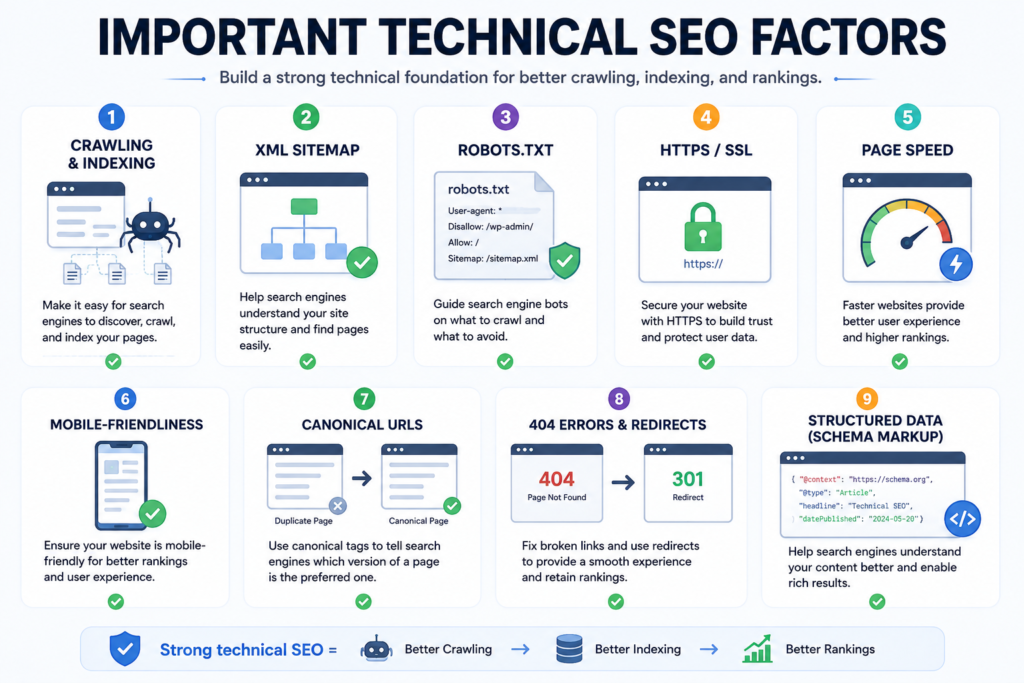
Crawling and Indexing
Crawling is the process through which search engine bots discover and access pages on your website, while indexing is the process of storing and organizing those pages in a search engine’s database. Technical SEO helps ensure that important pages can be crawled and indexed properly.
XML Sitemap
An XML sitemap is a file that lists important URLs on your website and helps search engines discover them more efficiently. A properly configured sitemap can be especially useful for larger websites or websites with new and frequently updated pages.
Robots.txt
The robots.txt file gives instructions to search engine crawlers about which areas of a website they should or should not crawl. It should be configured carefully so that important pages and resources are not accidentally blocked.
Website Structure and URL Structure
A clear website structure helps both users and search engines understand how different pages are organized. URLs should be descriptive, readable, and logically structured. A well-organized site also makes it easier for search engines to discover important pages.
HTTPS and SSL
HTTPS encrypts the connection between a website and its visitors, helping protect data exchanged between them. Websites should use HTTPS correctly and maintain a valid SSL/TLS certificate to provide a secure browsing experience.
Mobile-Friendliness
A mobile-friendly website should work properly across different screen sizes and devices. Since many users access websites through mobile devices, responsive design, readable text, usable buttons, and properly displayed content are important for both user experience and SEO.
Page Speed and Core Web Vitals
Page speed affects how quickly users can access and interact with a webpage. Core Web Vitals are Google’s user-experience metrics that focus on loading performance, interactivity, and visual stability. Improving website performance can provide a better experience for visitors.
Canonical URLs
Canonical URLs help search engines understand which version of a page should be treated as the preferred or primary version when similar or duplicate URLs exist. Correct canonical implementation can help prevent confusion caused by multiple versions of the same content.
404 Errors and Redirects
A 404 error occurs when a requested page cannot be found. Too many broken links can create a poor user experience. Proper redirects, such as a 301 redirect when appropriate, can help send users and search engines from an old or removed URL to a relevant alternative.
Structured Data and Schema Markup
Structured data is a standardized way of providing additional information about a webpage to search engines. Schema.org vocabulary can be used to describe things such as articles, products, events, organizations, and other types of content. When eligible, structured data can help search engines understand a page and may make it eligible for certain enhanced search results.
Duplicate Content
Duplicate content occurs when substantially similar or identical content appears on multiple URLs. It can make it harder for search engines to determine which version should be considered the primary page. Canonical tags, redirects, and a clear URL structure can help manage duplicate-content issues
Technical SEO Checklist for Beginners
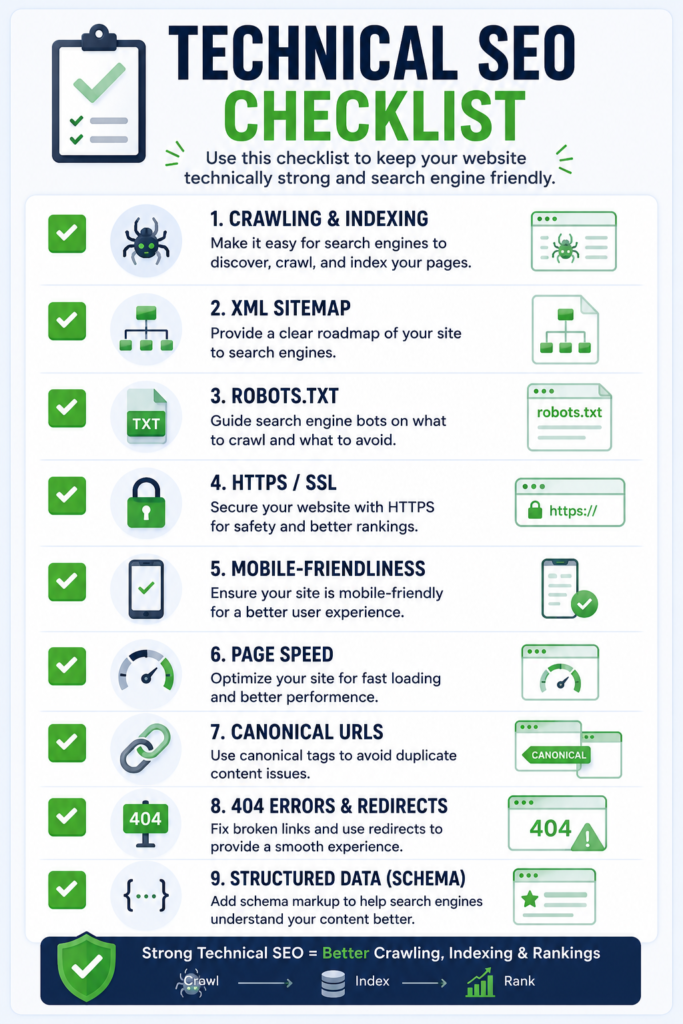
A technical SEO checklist helps you systematically review the important technical elements of a website. Beginners can use the following steps to identify common issues and maintain a technically healthy website.
Check Crawling and Indexing
Make sure search engines can access and crawl your important pages. Check whether important pages are indexed and look for pages that are accidentally blocked or excluded from search results.
Check Your XML Sitemap
Make sure your XML sitemap exists, contains important URLs, and is accessible to search engines. Also check that it does not contain unnecessary, broken, or redirected URLs.
Review Robots.txt
Check your robots.txt file to make sure it is not accidentally blocking important pages or resources. Verify that the sitemap URL is correctly mentioned if you are using one.
Check URLs and Website Structure
Review your website’s navigation and URL structure. Keep URLs clear, descriptive, and logically organized, and make sure important pages can be reached through internal links.
Check HTTPS and Mobile-Friendliness
Make sure your website uses HTTPS correctly and does not have security certificate issues. Also check that your pages work properly on mobile devices and that content, buttons, images, and navigation display correctly.
Test Page Speed and Core Web Vitals
Test important pages using tools such as Google PageSpeed Insights. Look for performance issues affecting loading, interactivity, and visual stability, and optimize them where necessary.
Find Broken Links and 404 Errors
Identify broken internal links and pages returning 404 errors. Fix incorrect links, restore pages when appropriate, or redirect removed URLs to relevant alternatives.
Check Canonical Tags and Duplicate Content
Look for duplicate or very similar pages and check whether canonical tags are correctly implemented where necessary. Make sure the preferred version of a page is clear to search engines.
Validate Structured Data
Check whether your structured data is correctly implemented and free from errors. Use Google’s relevant testing tools to validate eligible structured-data markup before publishing or updating pages
Best Technical SEO Tools
Technical SEO tools help you find, analyze, and fix technical issues that may affect how search engines crawl, understand, and display your website. Beginners do not need dozens of tools; a few reliable ones are enough to get started.
Google Search Console
Google Search Console is a free tool from Google that helps website owners monitor their website’s presence in Google Search. You can use it to check indexing issues, sitemap status, search performance, Core Web Vitals, and other search-related problems.
Google PageSpeed Insights
Google PageSpeed Insights analyzes the performance of individual webpages on both mobile and desktop devices. It provides performance data and suggestions for improving loading speed, responsiveness, and other user-experience factors.
Screaming Frog
Screaming Frog SEO Spider is a website crawler that can scan a website and identify technical SEO issues. It can help you find broken links, missing or duplicate titles and meta descriptions, redirects, canonical issues, status codes, and other technical problems.
Google Rich Results Test
Google’s Rich Results Test allows you to test whether a webpage’s structured data is eligible for certain rich results in Google Search. It can help identify structured-data issues and show which rich result types Google can detect on a page.
Other Useful SEO Tools
Depending on your needs, you can also use tools such as Google’s Mobile-Friendly resources, Chrome DevTools, GTmetrix, Ahrefs, Semrush, and Bing Webmaster Tools for additional technical SEO analysis, performance testing, backlink research, and search monitoring.
For beginners, start with Google Search Console and PageSpeed Insights, then add tools like Screaming Frog and other SEO platforms as your technical SEO needs become more advanced.
Common Technical SEO Mistakes
Even small technical issues can make it harder for search engines to crawl, understand, or index a website. Avoiding these common mistakes can help maintain a healthier technical SEO foundation.
Blocking Important Pages from Crawlers
One common mistake is accidentally blocking important pages through the robots.txt file or other directives. Before blocking any URL, make sure it does not contain content that you want search engines to discover and access.
Having an Incorrect Sitemap
An XML sitemap should contain the important, canonical URLs that you want search engines to discover. Including broken, redirected, or irrelevant URLs can make the sitemap less useful and may create unnecessary crawling signals.
Ignoring Mobile Performance
A website may look fine on a desktop but still provide a poor experience on mobile devices. Ignoring mobile usability, slow loading times, small text, or difficult-to-use buttons can negatively affect the user experience.
Using Incorrect Canonical Tags
Incorrect canonical tags can tell search engines that the wrong URL is the preferred version of a page. Always check that canonical URLs point to the intended, indexable version of the content.
Leaving Broken Links and 404 Errors Unresolved
Broken links can lead users and search engines to pages that no longer exist. Regularly check for broken internal links and fix them, update them, or use an appropriate redirect when necessary.
Creating Duplicate Pages
Creating multiple URLs with identical or very similar content can make it harder for search engines to determine which version to prioritize. Use a clear URL structure and appropriate canonicalization or redirects to manage duplicate pages.
How to Do a Technical SEO Audit
A technical SEO audit is the process of checking a website for technical issues that may affect crawling, indexing, performance, usability, and search visibility. A basic audit can be performed by following these steps:
Step 1: Check Website Accessibility
First, make sure your website is accessible to both users and search engine crawlers. Check that important pages load correctly, use HTTPS, and are not accidentally blocked by robots.txt or other directives.
Step 2: Check Crawling and Indexing
Check whether search engines can crawl and index your important pages. Use Google Search Console to identify indexing issues, excluded pages, and other problems that may prevent important URLs from appearing in Google’s index.
Step 3: Check Technical Issues
Look for common technical problems such as broken links, 404 errors, redirect issues, incorrect canonical tags, duplicate content, and problems with your XML sitemap or robots.txt file.
Step 4: Check Performance and Mobile Usability
Test your website’s performance on both mobile and desktop devices. Check Core Web Vitals, loading performance, mobile usability, images, and other elements that can affect the user experience.
Step 5: Fix and Monitor Issues
Once you identify technical issues, prioritize and fix the most important ones first. After making changes, monitor your website through tools such as Google Search Console and regularly repeat technical audits to catch new problems.
Why Technical SEO Matters for Search Visibility
Technical SEO matters because search engines need to be able to access, crawl, understand, and index your website before its pages can appear in search results.
A technically healthy website helps search engines discover important pages and understand how different parts of the website are connected. It also helps prevent common issues such as blocked pages, indexing problems, broken links, duplicate URLs, and slow or poorly optimized pages.
However, Technical SEO alone does not guarantee higher rankings. It provides a strong foundation that allows your content to be properly accessed and processed by search engines.
When Technical SEO, high-quality content, and Off-Page SEO work together, they can support better search visibility, user experience, and overall SEO performance.
Technical SEO: Key Takeaways
Technical SEO is an essential part of a successful SEO strategy because it ensures that your website has a strong technical foundation for search engines and users. From crawling and indexing to page speed, mobile-friendliness, sitemaps, redirects, and structured data, each technical element can contribute to a healthier website.
You do not need to fix everything at once, especially if you are a beginner. Start with the basics, regularly check your website for technical issues, and use tools such as Google Search Console and PageSpeed Insights to monitor your progress.
Remember, Technical SEO is not a one-time task. Websites change over time, so regularly auditing and maintaining your website can help keep it accessible, usable, and search-engine friendly.